
Nested Loops in Python
Nested loops are simply a loop inside another loop. Sounds straightforward, but a lot of people get confused here. We use them when we need to go through multidimensional data - Excel tables, scanning a planet's surface point by point, searching maps, or analyzing satellite images.
Let's Start with a Simple Loop
First, let's see how a regular loop works. Imagine we're scanning a single row of the Martian surface divided into 1 x 1 km squares:
# Scanning one row of Mars surface
for x_position in range(5):
    print(f"Scanning position X: {x_position}")
This gives us:
Scanning position X: 0
Scanning position X: 1
Scanning position X: 2
Scanning position X: 3
Scanning position X: 4
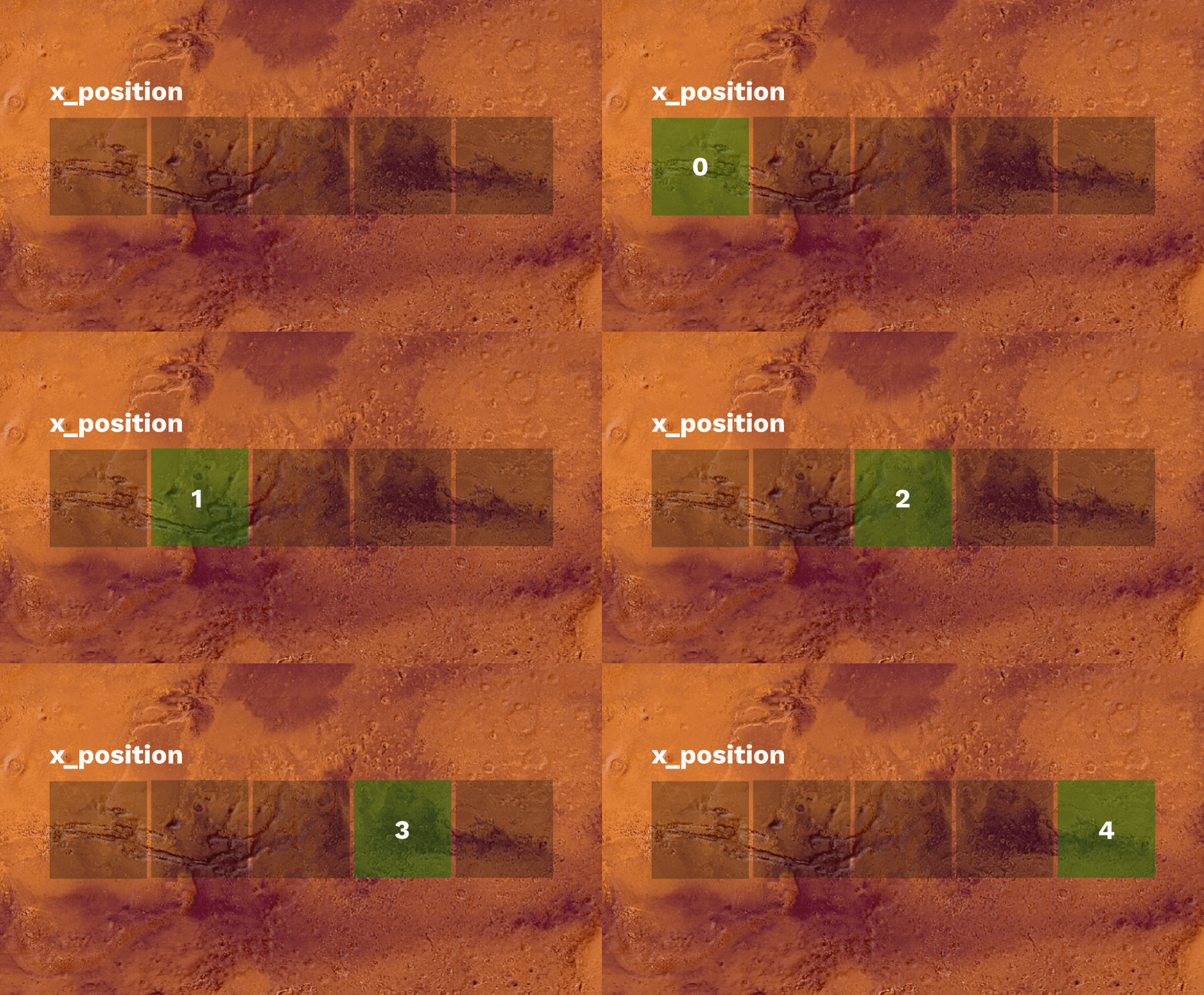
The problem is that's just one line. Mars surface has two dimensions - latitude and longitude. In this case, x_position shows us step by step which square we're scanning. The print() doesn't actually scan anything on Mars - it's just about observing the changing counter and performing some operation in each loop iteration.
Adding a Second Loop
Now let's scan an entire sector - meaning multiple rows:
# Scanning entire 5x5 km sector
for y_position in range(5):
    for x_position in range(5):
        print(f"Scanning ({x_position}, {y_position})")
What's happening here?
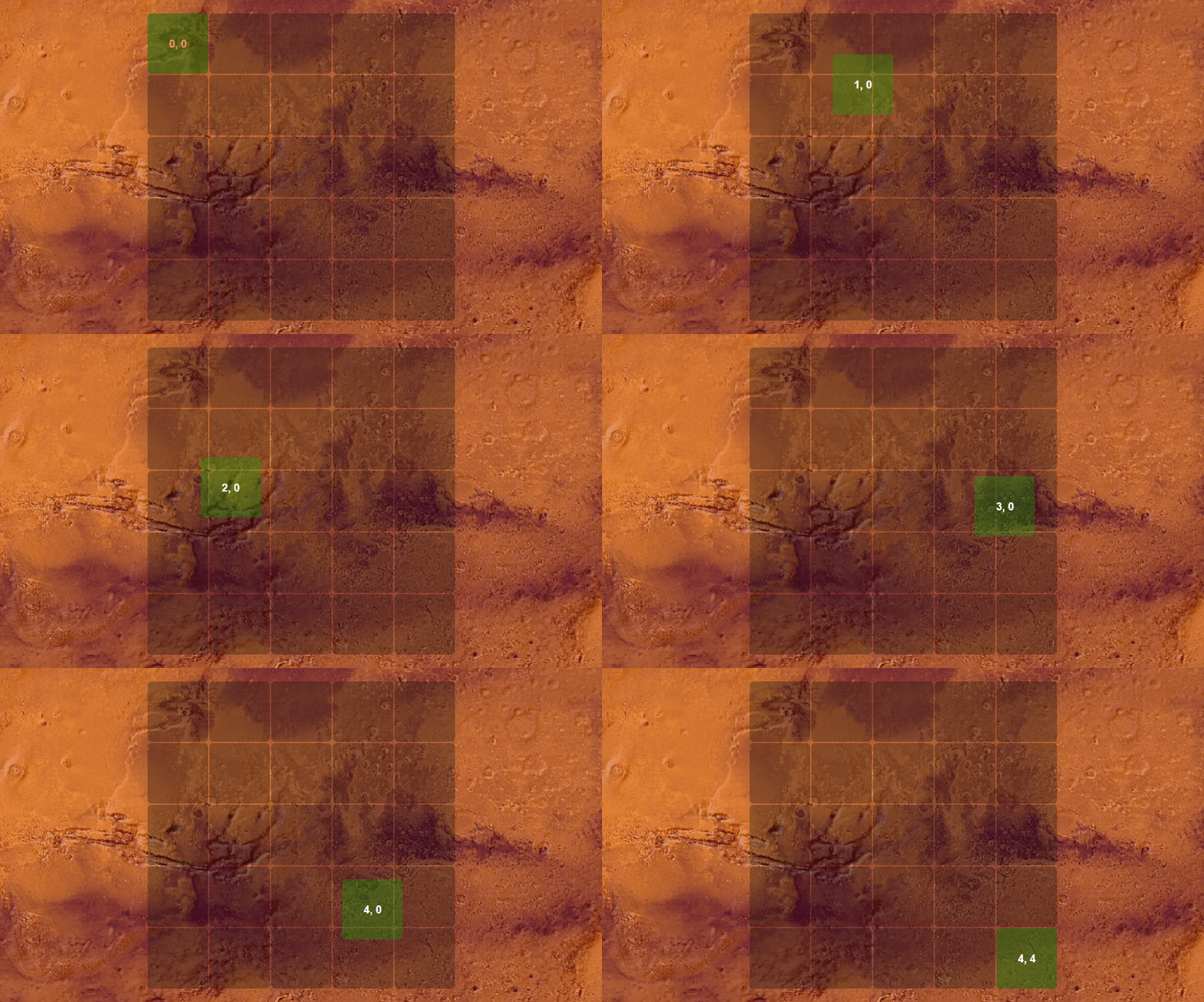
The outer loop (y_position) handles rows. For each row, the inner loop (x_position) goes through all columns before moving to the next row. So:
- When
y_position = 0,x_positiongoes through 0, 1, 2, 3, 4 - Then
y_position = 1, and againx_positionthrough 0, 1, 2, 3, 4 - And so on...
In total we have 25 points (5×5).
Why We DON'T Use the Popular i, j Here
You'll see tons of examples online using i and j. The problem is nobody knows what they mean:
# BAD - what is i? What is j?
for i in range(5):
    for j in range(5):
        print(i, j)
Compare that with:
# GOOD - immediately clear what it is
for row in range(5):
    for column in range(5):
        print(row, column)
When you come back to this code in a week, you'll instantly understand what the second version does. In the Mars examples, we use names like x_position, y_position, scan_x, rover_id - anything that helps understand the code.
Practical Example: Searching for Lost Rovers
We'll create a radar system that scans Mars surface and searches for rovers that lost contact with base. First we'll randomly place a few rovers, then find them. A more down-to-earth example could involve searching through table results to locate incorrect financial calculations. Searching for rovers on Mars is more interesting :D
import random

# Generate positions of lost rovers in a 10x10 km sector
lost_rovers = []
rover_names = ["Spirit", "Opportunity", "Curiosity", "Perseverance", "Zhurong"]

for rover_id in range(5):
    x = random.randint(0, 9)
    y = random.randint(0, 9)
    lost_rovers.append((x, y, rover_names[rover_id]))

print("=== MARS SURFACE MAP ===\n")

# Scan surface point by point
for scan_y in range(10):
    for scan_x in range(10):
        # Check if there's a rover at this position
        rover_found = None
        for x, y, name in lost_rovers:
            if x == scan_x and y == scan_y:
                rover_found = name
                break

        if rover_found:
            print("🔴", end=" ")  # Rover!
        else:
            print("⚫", end=" ")  # Empty surface
    print()  # New line after each row

# List of found rovers
print("\n=== FOUND ROVERS REPORT ===\n")
for scan_y in range(10):
    for scan_x in range(10):
        for x, y, name in lost_rovers:
            if x == scan_x and y == scan_y:
                print(f"🛰️  Rover {name} found at coordinates ({scan_x}, {scan_y})")
Output might look like this:
=== MARS SURFACE MAP ===

⚫ ⚫ ⚫ 🔴 ⚫ ⚫ ⚫ ⚫ ⚫ ⚫
⚫ ⚫ ⚫ ⚫ ⚫ ⚫ ⚫ ⚫ ⚫ ⚫
⚫ ⚫ ⚫ ⚫ ⚫ 🔴 ⚫ ⚫ ⚫ ⚫
⚫ ⚫ ⚫ ⚫ ⚫ ⚫ ⚫ ⚫ ⚫ ⚫
⚫ ⚫ ⚫ ⚫ ⚫ ⚫ ⚫ ⚫ ⚫ ⚫
⚫ 🔴 ⚫ ⚫ ⚫ ⚫ ⚫ ⚫ ⚫ ⚫
⚫ ⚫ ⚫ ⚫ ⚫ ⚫ ⚫ ⚫ ⚫ ⚫
⚫ ⚫ ⚫ ⚫ ⚫ ⚫ ⚫ 🔴 ⚫ ⚫
⚫ ⚫ ⚫ ⚫ ⚫ ⚫ ⚫ ⚫ ⚫ ⚫
⚫ ⚫ ⚫ ⚫ ⚫ ⚫ 🔴 ⚫ ⚫ ⚫

=== FOUND ROVERS REPORT ===

🛰️  Rover Spirit found at coordinates (3, 0)
🛰️  Rover Opportunity found at coordinates (5, 2)
🛰️  Rover Curiosity found at coordinates (1, 5)
🛰️  Rover Perseverance found at coordinates (7, 7)
🛰️  Rover Zhurong found at coordinates (6, 9)
Notice that the first loop creates a visualization (draws the map), while the second prints a text list. Both do the same scanning, just display results differently.
Common Beginner Mistakes
Mistake 1: Same Variable Names
# BAD - inner loop overwrites x!
for x in range(3):
    for x in range(3):  # ← Overwrites outer x
        print(x)
Python won't throw an error, but you'll get weird results. Always use different names.
Mistake 2: Wrong Indentation
# Where should this print go?
for y in range(3):
    for x in range(3):
        print(f"({x}, {y})", end=" ")
    print()  # ← This executes after each row

print("Scanning complete")  # ← This executes once at the end
Indentation in Python isn't decoration - it determines which code belongs to which loop.
Mistake 3: Confusing the Order
# Does this scan horizontally or vertically?
for y in range(3):
    for x in range(3):
        print(f"({x}, {y})")
The outer loop (y) changes slower. The inner one (x) runs completely for each value of the outer. If this confuses you, add more print() statements to see what's happening:
for y in range(3):
    print(f"--- Row {y} ---")
    for x in range(3):
        print(f"  Position ({x}, {y})")
More Complex Example: Rover Systems Diagnostics
We can nest more than two loops. After locating a rover, we need to check all its systems. Each rover has 8 internal sensors that need scanning. Don't worry about the random and time imports for now, though you can probably guess what they're for :)
import random
import time

# List of rovers with their positions
rovers = [
    {"name": "Spirit", "x": 3, "y": 5},
    {"name": "Opportunity", "x": 7, "y": 2},
    {"name": "Curiosity", "x": 1, "y": 8}
]

# System names to check
systems = [
    "Solar panel",
    "Main battery",
    "Communication system",
    "HD Camera",
    "Temperature sensor",
    "Wheel drive",
    "Robotic arm",
    "Soil analysis module"
]

print("=== STARTING SECTOR SCAN ===\n")

# First loop: scan the map
for scan_y in range(10):
    for scan_x in range(10):

        # Second loop: check each rover
        for rover in rovers:
            if rover["x"] == scan_x and rover["y"] == scan_y:
                print(f"\n🛰️  CONTACT! Rover {rover['name']} at position ({scan_x}, {scan_y})")
                print(f"Starting systems diagnostics...\n")
                time.sleep(0.5)

                # Third loop: check systems in the rover
                for system_id in range(len(systems)):
                    system_name = systems[system_id]

                    # Randomly generate status (80% chance of OK)
                    is_working = random.random() > 0.2

                    if is_working:
                        status = "✓ OK"
                    else:
                        status = "✗ DAMAGED"

                    print(f"  System {system_id + 1}/8 - {system_name}: {status}")
                    time.sleep(0.2)

                print(f"\n--- Rover {rover['name']} diagnostics complete ---\n")

print("\n=== SCAN COMPLETE ====")
This code executes like this:
- Outer loop - scans Y coordinates (0-9)
- Second loop - for each Y, scans X coordinates (0-9)
- Third loop - checks if there's a rover at this position
- Fourth loop - if rover found, checks each of 8 systems
Output:
=== STARTING SECTOR SCAN ===

🛰️  CONTACT! Rover Opportunity at position (7, 2)
Starting systems diagnostics...

  System 1/8 - Solar panel: ✓ OK
  System 2/8 - Main battery: ✓ OK
  System 3/8 - Communication system: ✗ DAMAGED
  System 4/8 - HD Camera: ✓ OK
  System 5/8 - Temperature sensor: ✓ OK
  System 6/8 - Wheel drive: ✓ OK
  System 7/8 - Robotic arm: ✓ OK
  System 8/8 - Soil analysis module: ✓ OK

--- Rover Opportunity diagnostics complete ---

🛰️  CONTACT! Rover Spirit at position (3, 5)
Starting systems diagnostics...

  System 1/8 - Solar panel: ✓ OK
  System 2/8 - Main battery: ✗ DAMAGED
  System 3/8 - Communication system: ✓ OK
  System 4/8 - HD Camera: ✓ OK
  System 5/8 - Temperature sensor: ✓ OK
  System 6/8 - Wheel drive: ✓ OK
  System 7/8 - Robotic arm: ✓ OK
  System 8/8 - Soil analysis module: ✓ OK

--- Rover Spirit diagnostics complete ---

🛰️  CONTACT! Rover Curiosity at position (1, 8)
Starting systems diagnostics...

  System 1/8 - Solar panel: ✓ OK
  System 2/8 - Main battery: ✓ OK
  System 3/8 - Communication system: ✓ OK
  System 4/8 - HD Camera: ✓ OK
  System 5/8 - Temperature sensor: ✗ DAMAGED
  System 6/8 - Wheel drive: ✓ OK
  System 7/8 - Robotic arm: ✓ OK
  System 8/8 - Soil analysis module: ✓ OK

--- Rover Curiosity diagnostics complete ---

=== SCAN COMPLETE ====
Notice how each loop has its job:
- Loops 1 and 2: Scan coordinates on the map
- Loop 3: Checks the list of rovers
- Loop 4: Goes through systems in the rover
When to Use Nested Loops?
Here are situations where they come in handy:
- 2D/3D data - maps, satellite images, coordinate grids
- Comparing everything with everything - checking distances between all objects
- Searching nested structures - like checking systems in each vehicle
- Generating combinations - all possible pairs, triples, etc.
- Matrix operations - mathematical calculations on arrays
Training Missions
Time to practice! Try these exercises:
Mission 1: Temperature Map
Create an 8×8 temperature map of Mars surface. Randomly generate temperatures from -100°C to 20°C for each point. Display the map using colored emojis:
- 🟦 below -50°C
- 🟨 from -50°C to 0°C
- 🟥 above 0°C
Mission 2: Distances Between Rovers
You have a list of rovers with their positions (x, y). Use nested loops to calculate the distance between each pair of rovers. Formula: sqrt((x2-x1)² + (y2-y1)²)
import math

rovers = [
    ("Spirit", 2, 3),
    ("Opportunity", 5, 1),
    ("Curiosity", 4, 4),
    ("Perseverance", 7, 2)
]
Mission 3: Soil Sample Analysis
Each rover collected 5 soil samples. Each sample has 3 parameters: pH, humidity (%), iron content (%). Use three nested loops to:
- Go through all rovers
- For each rover, go through all samples
- For each sample, display all parameters
Bonus: Find the sample with the highest iron content among all rovers.
Nested loops look scary at first, but once you understand the principle "outer changes slower, inner faster" - everything becomes simple. Best way to learn? Write a few examples yourself and use print() to see what happens at each step.
Good luck scanning Mars!
import random
import time

# List of rovers with their positions
rovers = [
    {"name": "Spirit", "x": 3, "y": 5},
    {"name": "Opportunity", "x": 7, "y": 2},
    {"name": "Curiosity", "x": 1, "y": 8}
]

# System names to check
systems = [
    "Solar panel",
    "Main battery",
    "Communication system",
    "HD Camera",
    "Temperature sensor",
    "Wheel drive",
    "Robotic arm",
    "Soil analysis module"
]

print("=== STARTING SECTOR SCAN ===\n")

# First loop: scan the map
for scan_y in range(10):
    for scan_x in range(10):

        # Second loop: check each rover
        for rover in rovers:
            if rover["x"] == scan_x and rover["y"] == scan_y:
                print(f"\n?️  CONTACT! Rover {rover['name']} at position ({scan_x}, {scan_y})")
                print(f"Starting systems diagnostics...\n")
                time.sleep(0.5)

                # Third loop: check systems in the rover
                for system_id in range(len(systems)):
                    system_name = systems[system_id]

                    # Randomly generate status (80% chance of OK)
                    is_working = random.random() > 0.2

                    if is_working:
                        status = "✓ OK"
                    else:
                        status = "✗ DAMAGED"

                    print(f"  System {system_id + 1}/8 - {system_name}: {status}")
                    time.sleep(0.2)

                print(f"\n--- Rover {rover['name']} diagnostics complete ---\n")

print("\n=== SCAN COMPLETE ====")